How to Make an AI Short Film From a Script: A Tested Workflow and Its Real Cost
Most AI video guides stop at one clip of five seconds. A short film is a different problem: the same characters have to look the same in every shot, the shots have to be planned before you pay for video, and the bill adds up across dozens of generations. Between October 23 and November 7, 2026 we pushed two short projects through GenFlick, a studio-style tool that plans the film for you, and wrote down every step and every credit. This is the workflow we would give a beginner, with the numbers we measured and the failures we hit.
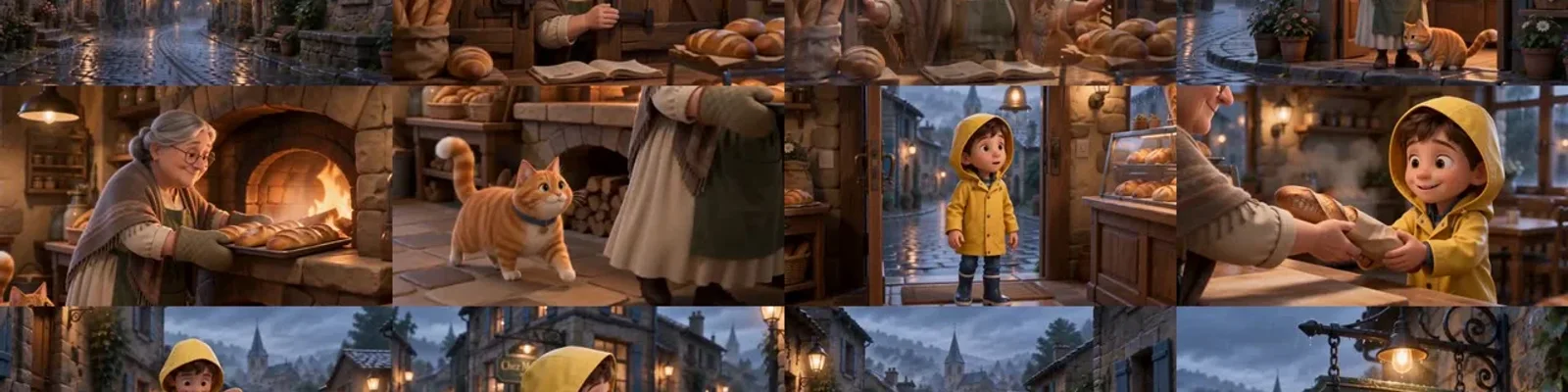
Write a one-page brief, lock your characters and locations as reference sheets, check the keyframes before paying for video, and only then choose a video model. In our test the same 30-second, three-scene film cost 81 credits at 720p with Seedance 2.0 Fast and would have cost 363 credits at 1080p. Characters stayed consistent across scenes. The clip-by-clip route broke twice in our tests, and a retest on November 5 showed it fixed, with a trap left behind. We did not run this workflow in Deevid AI.
Can you make a short film with AI, and what does it really take?
Yes, a short film is within reach of one person with no crew, as long as you accept two limits. Each video model generates only a few seconds at a time, so a film is a chain of many short generations. And every generation costs credits, so the planning you do before you press generate decides most of the bill.
There are two families of tools. Clip generators, such as the ones bundled in Deevid AI, turn a prompt or an image into one clip and leave the story to you. Studio tools plan the whole film: script, cast, locations, shot list, then the video. We tested the second kind with GenFlick, which describes itself as an AI film studio and works through a director chat called Genny. If you want the clip generator route first, our guide on how to make AI videos covers it.
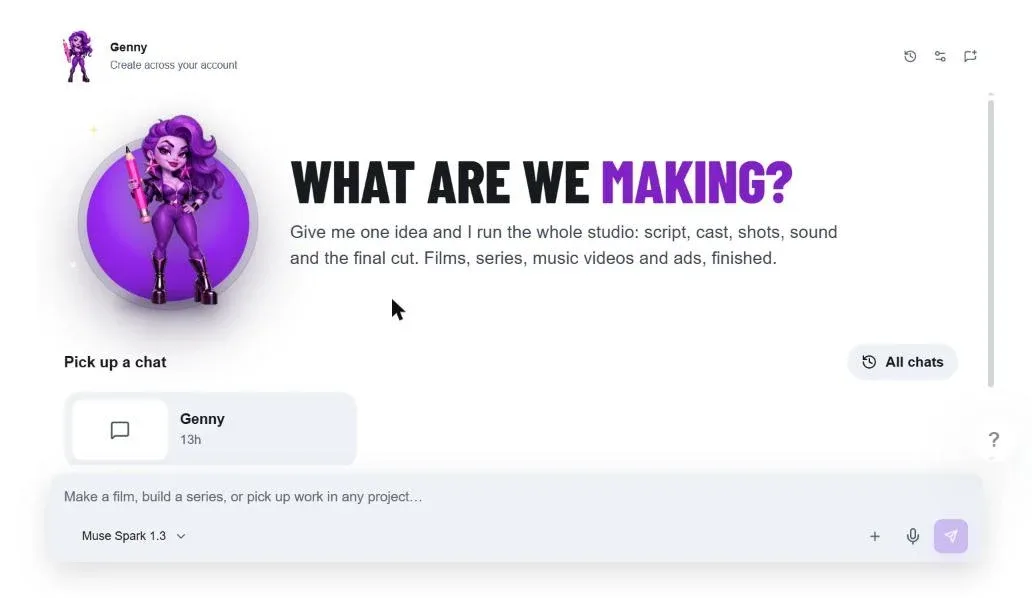
One note on our method. We wrote our briefs in French, on purpose, to see whether a non-English brief works. That is why you will see a few French names in our screenshots. The studio interface was English only during our tests; as of November 15, 2026, the public website also comes in other languages, but we have not checked whether the studio follows. Prompts in French were understood in every test.
Step 1: write a brief the tool can plan from
A studio tool does not need a screenplay. It needs a brief that answers five questions: who is in it, where it happens, what happens in three beats, what it should feel like, and how long it runs. Our first test was a 30-second animated story called Chez Margot: an elderly baker, her ginger cat and a small boy in a yellow raincoat who comes in out of the rain for bread. Three scenes, three characters, one location, one mood.
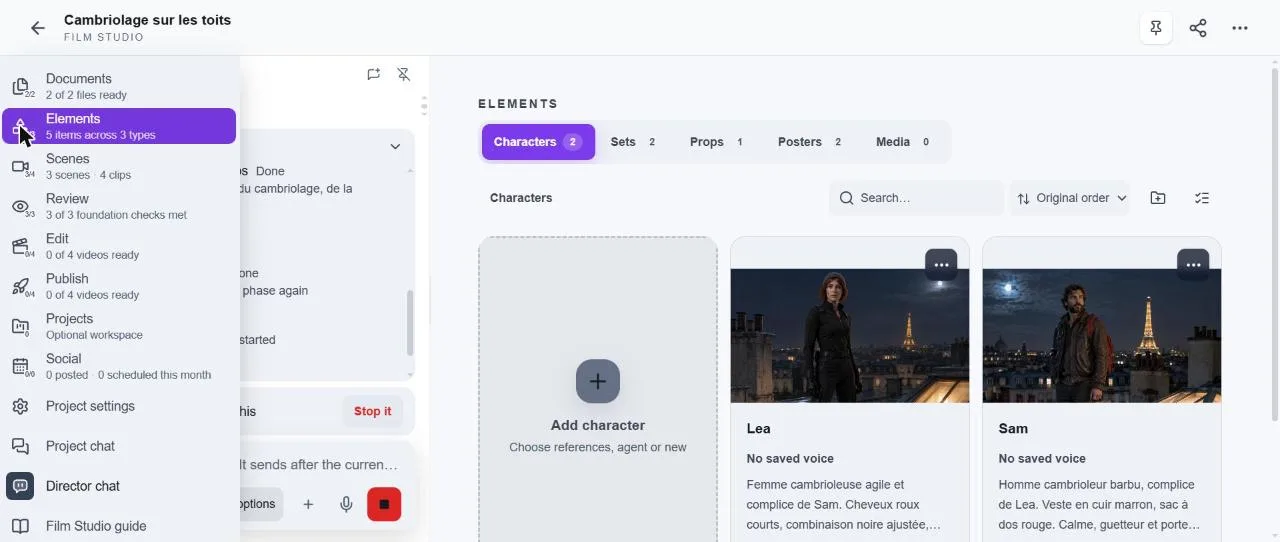
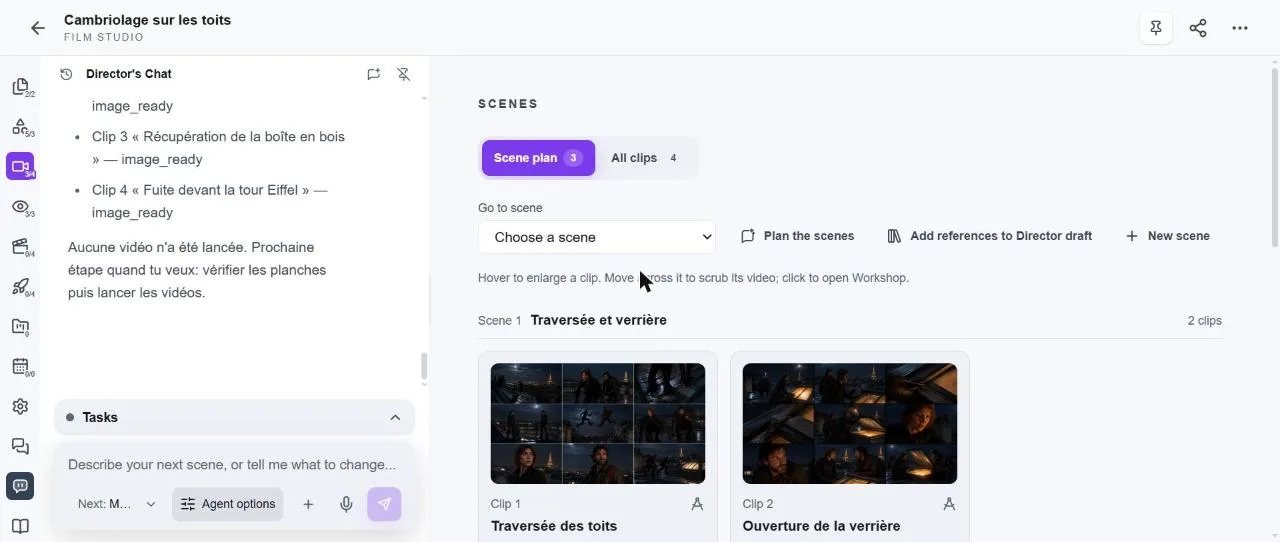
Our second test, a heist short called Cambriolage sur les toits (rooftop burglary), used the same pattern with two adult characters on Paris rooftops. The director chat turned the brief into two named characters, sets, props, three scenes and four clips, and it showed the estimated cost of the preparation before we confirmed it: 8.5 credits net.
Write your brief with these rules:
- Keep the cast small. Two or three recurring characters is the sweet spot. Every extra character is another reference sheet to keep consistent.
- Keep the location count low. One main set and one exterior, not six. Locations drift just like faces do.
- Describe costumes in fixed words. "Grey bun, round glasses, brown shawl, green apron" will survive. "Cozy grandmother vibe" will not.
- Say the duration and the aspect ratio up front. The plan, and therefore the price, depends on both.
Can you write the script in ChatGPT or Claude and send it to GenFlick?
Yes, since November 10, 2026. GenFlick added an MCP (Model Context Protocol) connection, so ChatGPT, Claude or Codex can work directly on the projects saved in your studio. For a script-first workflow that matters: you can draft and rework the brief in the assistant you already write with, and the document lands in GenFlick instead of being pasted across. We read GenFlick's setup page on November 15, 2026. We have not connected it to our test account, so what follows is what GenFlick documents, not something we ran.
- Setup. Add GenFlick as a remote MCP server in your assistant (one URL covers the Film and Series studios), choose OAuth, sign in, then give access to the whole account or only to chosen workspaces. No plugin to download. GenFlick lists steps for Claude, Claude Code, Codex and ChatGPT (developer mode).
- What the assistant can do. Read a project's story brief, save a new document such as a series brief with premise, characters and a first-episode outline, revise a passage, or hand an approved task to a studio agent. The work stays in GenFlick even if the chat disconnects.
- Credits stay under your control. Paid production shows a proposal with the task and a credit cap that you approve inside GenFlick. The connection does not buy credits or turn on automatic reloads.
- Availability. Custom MCP connections depend on your assistant, your plan with it and, at work, your admin. Images from older chats must be attached as files or uploaded to your GenFlick Library first.
It does not change the rest of this guide: the keyframes, the model choice and the render still happen in GenFlick, at the same speed and prices.
Step 2: lock your characters and locations before any video
This is the step that separates a film from a pile of clips. Before generating video, GenFlick builds a reference sheet for each character and each set, then feeds those sheets into every later image and clip. You can review them, regenerate them or replace them with your own pictures.
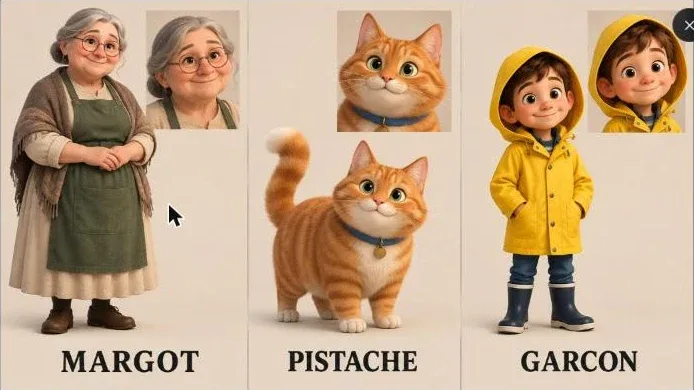
In our 30-second test the result held up. The baker kept her grey bun, glasses, shawl and green apron in all three scenes, the cat kept its blue collar, and the boy kept his yellow raincoat. We looked for drift and did not find any in the characters. If you take one habit from this guide, it is to approve these sheets deliberately. A wrong sheet costs a few credits now and ruins every clip later.
The heist project gave the same kind of result on the planning side: two named characters, their sets and props, and clip boards that kept the same two cast members and the same wet rooftop geography across panels.
Step 3: review the keyframes, the cheapest place to fix mistakes
Before any video is rendered, the tool generates still keyframes for every shot. This is the cheapest checkpoint in the whole process: a bad composition is a still image you can reject, not a video you already paid for. Our 30-second film produced 48 keyframes, and generating them took 36 minutes in our run. Count that time in your plan, because it is not instant.
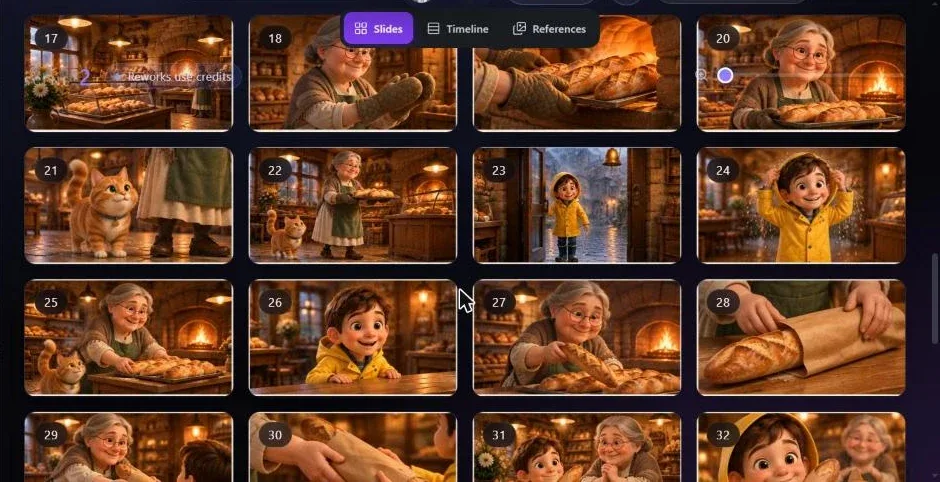
What to look for when you scroll through the grid:
- Identity: same face, same costume, same colors from frame to frame.
- Geography: the oven, the counter and the door stay where they were.
- Text in the picture: signs and labels. Our shop sign came out correctly, but generated text is the first thing to break.
- Action logic: the object a character holds in one frame is still in the next one.
Fix problems here, by editing the prompt of one frame or by regenerating it, rather than after the video exists.
Step 4: choose the video model and read the price before you click
GenFlick lets you pick the video model for the finished film. Its picker listed Seedance 2.0 Mini, Fast and Regular, Seedance 2.5, MiniMax H3 and H3 Max, Grok Imagine Video, Google Veo 3.1, Kling 3.0, PixVerse v6, Wan 2.6 and Runway among others. The useful part is that the dialog shows the total cost for the whole movie before you generate.
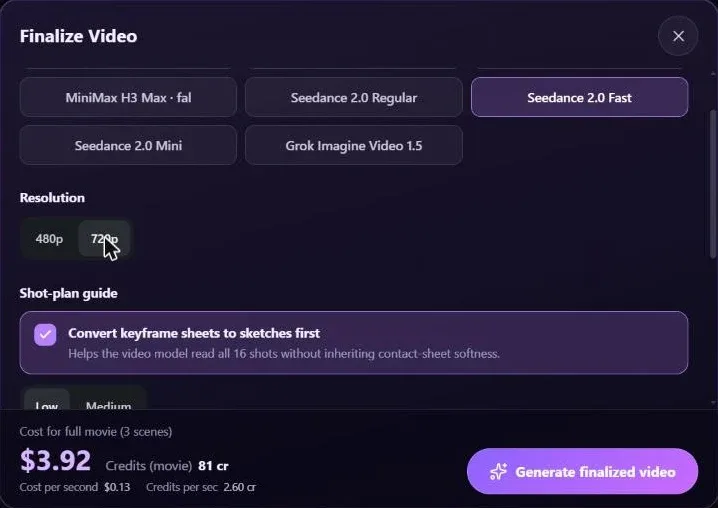
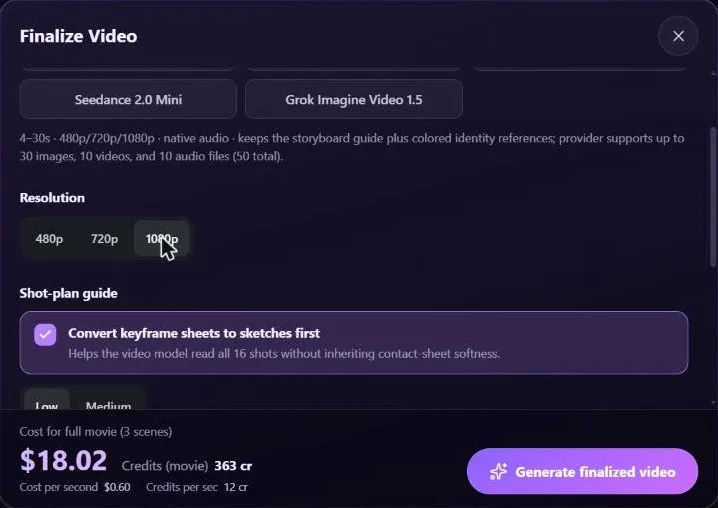
That is a gap of 4.5 times for the same story. We rendered the cheap one: 81 credits announced, 81 credits charged in the account ledger. The dialogs also show a dollar figure. It is lower than what the plan prices imply (about $0.05 per credit on screen against $0.071 to $0.124 on the plans), and we did not find out why, so we budget in credits and convert with the plan rates in the cost section below.
Our rule of thumb: draft at the cheapest model and 720p, judge the story, and only pay for a higher tier on the final pass if the film is worth it.
What our 30-second film looked like
The film rendered in about 11 minutes after the 36 minutes of keyframes, so roughly an hour of waiting for 30 seconds. The export had no watermark. Characters and the shop stayed consistent from scene to scene, the rainy street and the warm interior looked coherent, and the sign in the last shot read correctly.
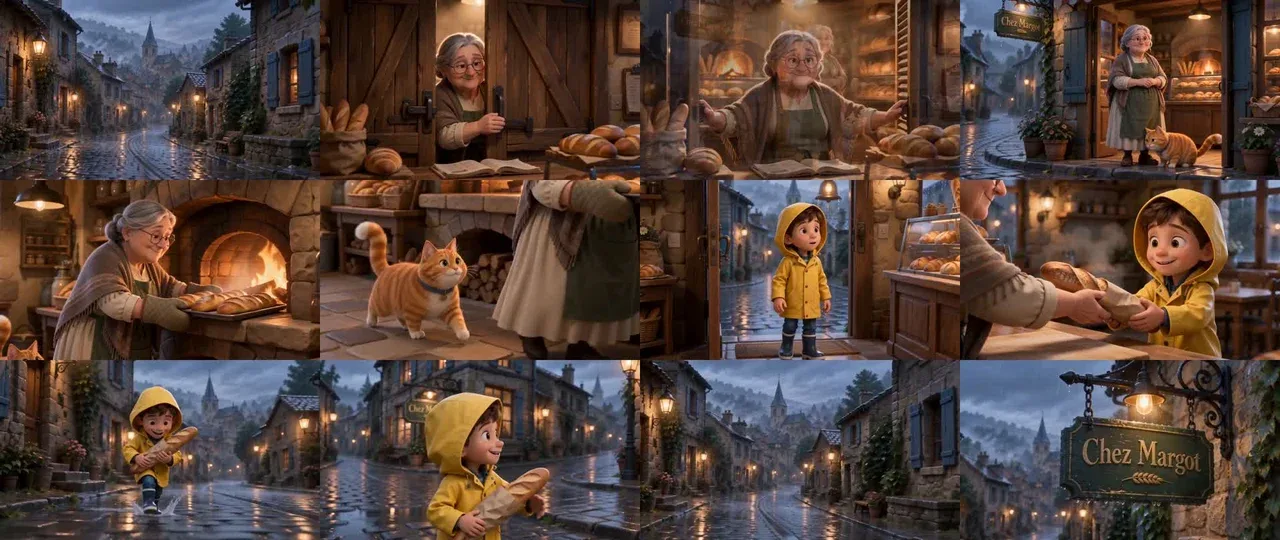
It is not flawless. Around the five-second mark there is a dissolve with a ghost image of the previous shot, the kind of artifact you see when a model blends two keyframes. For a short story shared on social media it is acceptable. For a client piece you would regenerate that scene.
The clip-by-clip route in Film Studio, and what broke
Besides the one-shot Storyboard to Film path, Film Studio lets you generate each clip yourself, with its own model, duration and references. It gives you more control, and it is where we hit the failures. We went through it in two sessions.
- October 25 to 26: the service was degraded. Several API routes returned HTTP 503 around 02:00 and the dashboard sat on a loading state. Pressing Generate video on clip 1 returned an HTTP 500 Internal Server Error. Adam King from GenFlick told us it was a bug on their side that affected all users, that a fix was live, and that we should use MiniMax for clips. The failed attempts debited no credits.
- October 25 to 26: a Song to Music Video project stayed stuck on "Creating 2 reference sheets" for more than 20 minutes, and an ads agent answered with "The chat action failed".
- November 5, the retest: the bug is fixed. With MiniMax H3 at 768p we created a new take, pressed Generate and the request returned HTTP 202, job accepted.
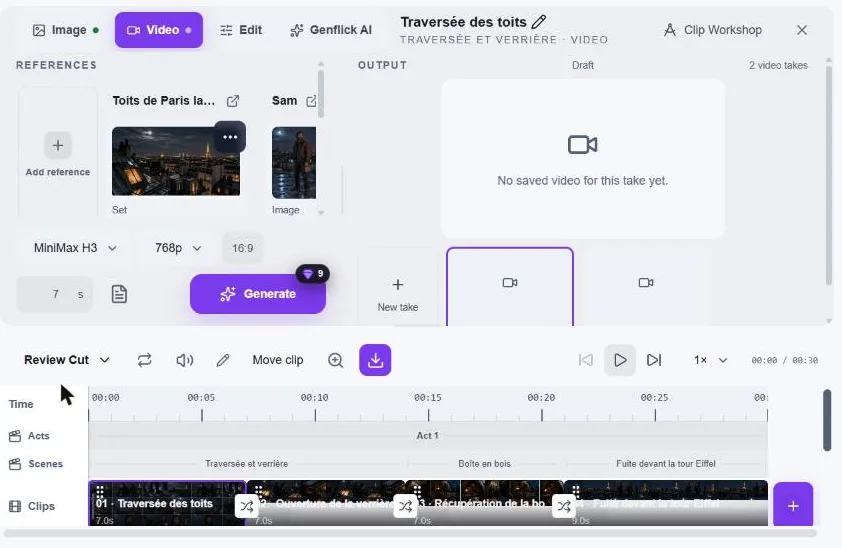
Two traps remain. A take that failed before the fix replays its old idempotency key when you press Generate again, and the server answers HTTP 409 without charging anything. The way out is to create a new take. And on a fresh clip, the first click on Generate only creates the take, while the second click sends the job, so the button can look dead the first time. Neither is fatal, but a beginner would think the tool had frozen.
The retest also confirmed the money side. We launched all four heist clips on MiniMax H3 at 768p (7, 7, 7 and 9 seconds). The Generate buttons announced 9, 9, 9 and 11 credits, a total of 38, and the account ledger showed exactly 38 debited. All four clips reached "Video ready", but each took more than a quarter of an hour, and the panel stayed on "Your first take is being prepared" until we reloaded the page. We watched clip 1: a 7.3-second file at 1344 x 768 with our two characters on the Paris rooftops, consistent with the boards. We did not watch the other three in full, so we make no claim about their quality.
Assembling the film failed on November 7. The new Export film dialog offers 720p, 1080p and 4K and says that cuts rendered in the browser are free at any resolution, while a server-side Fast stitch uses 1 to 8 credits depending on the number of clips. In our run, clicking a resolution crashed the view ("This view could not be opened") three times out of three, the 4K export was rejected by the renderer (render dimensions must not exceed 2,073,600 pixels, that is 1920 x 1080, and the 2 credits held were released), and the 720p export returned "Internal server error" twice. We did not get an assembled film out of this project.
Sound, voice-over and export: where credits quietly leak
Video is only half a film. Our notes on the audio and export side:
- The raw video output can be silent. For a 36-second ad on MiniMax H3 the generated file had no sound; narration and music were only mixed in at export.
- Voice-over in a separate editor. The Genedit voice tool produced a faithful French voice-over (we transcribed it back to check), but it cost 31 credits, including a 30-credit B-roll step with no price shown. It also reads the whole text field, instructions included, and its Download button did nothing for us.
- Music is cheap. A 45-second pop song with our own lyrics cost 3 credits, announced and charged, in under a minute, and the lyrics came out faithfully.
- 4K is an upscale. Generation tops out at 1080p. The 4K export option enlarges the file, our first 4K export stalled on "Preparing clips 0 of 1", and on November 7 the renderer rejected 4K outright.
- Exports changed during our tests. On October 23 every MP4 export cost 2 credits, including the two that stalled. By November 7 the browser export was announced as free, but it crashed or returned errors in our run.
The lesson is to budget a small reserve for sound and exports, and to write down the credit balance before and after each paid step, because the ledger is the only place where the real number appears. On our 36-second ad, the announced cost was 42 credits and the ledger showed 51, partly because the clip came out at 36 seconds instead of 30.
What a short film costs: our credit budget
Everything below is from our accounts, with GenFlick's test credits. We bought nothing.
| Job | Setup | Credits |
|---|---|---|
| 30 s film, 3 scenes | Seedance 2.0 Fast, 720p | 81 announced, 81 charged |
| Same film at 1080p | Seedance 2.5 | 363 announced, not run |
| 36 s ad | MiniMax H3, 768p | 42 announced, 51 in the ledger |
| Film Studio preparation | 2 characters, sets, 3 scenes, 4 clips | 8.5 net |
| Four clips (7, 7, 7 and 9 s) | MiniMax H3, 768p | 38 announced, 38 charged |
| French voice-over | Genedit | 31, including a 30-credit B-roll |
| 45 s song | AI Song Generator | 3 announced, 3 charged |
| Each MP4 export (October 23) | Any | 2 |
Our first test used 179.9 of the 200 credits GenFlick gave us. To turn credits into dollars, here are the plan prices we read on genflick.com/pricing on October 23, November 5 and November 15, 2026 (unchanged): Starter $19.90 a month for 160 credits ($0.124 a credit), Creator $49.90 for 500 ($0.10), Pro $200 for 2,400 ($0.083) and Studio $1,000 for 14,000 ($0.071). One-off packs run from 80 credits for $9.90 to 1,400 for $99.90, and purchased credits do not expire. The free plan includes the director chat and free images where available, while video uses credits and shows its price before you launch.
With those rates, our 81-credit film comes to about $10 at the Starter rate, $8 at Creator and $6.70 at Pro. The 1080p version at 363 credits would be about $45, $36 and $30. That is our arithmetic, not a price GenFlick quotes. On November 15, GenFlick advertised roughly 3, 9, 47 and 276 one-minute videos a month on its four plans, at the cheapest settings (slightly fewer than the 10, 48 and 284 shown in early November). The Pro promotion seen on November 5 (10% off the first year on annual billing) was gone by November 15, so check the live page.
Where a clip generator like Deevid AI fits in a film workflow
This site reviews Deevid AI, so the fair question is how it relates. We did not run this film workflow in Deevid AI, so we make no claim about how it would perform on it. What we can say is structural. A multi-model suite gives you clips, one prompt or one image at a time, and leaves continuity and assembly to you. A studio tool gives you continuity and assembly, and gives you less say on each shot.
That makes them complementary more than rival. A studio tool fits a story with recurring characters. A suite fits the hero shots you want to try on several models, or a single product shot you want to redo. If you go the suite route, start from our Deevid AI pricing guide to count credits per finished second, and see Deevid AI vs Kling and Deevid AI vs PixVerse for single-vendor alternatives. The honest comparison metric for either route is the cost per second of footage you actually keep, failed attempts included.
Mistakes that waste credits
- Skipping the keyframe review. Rejecting a still costs almost nothing. Rejecting a rendered scene costs a scene.
- Rendering at the top model first. The 720p draft cost 81 credits against 363 for 1080p. Use the cheap pass to judge the story.
- Trusting the announced price alone. The 36-second ad showed 42 credits and was billed 51. Check the ledger after each paid step.
- Adding characters late. A new character after the plan means a new reference sheet and re-checking every shot it touches.
- Putting instructions in the voice field. The voice tool reads everything in the box.
- Retrying a failed take. Create a new take instead, or you replay the old request and get an HTTP 409.
- Counting on 4K. It is an enlargement of a 1080p maximum.
Is it legal to make an AI film, and should you label it?
Making an AI film is legal in most places, but the details depend on your country, the platform you publish on and the tool's terms. This is not legal advice. Three practical habits help: read the commercial-use terms of the tool before client work, keep your prompts, reference images and generation dates on file, and say that the film is AI-generated when you publish it, following the disclosure rules of the platform. Do not use a real person's likeness without permission. Our disclosure page explains how we handle our own affiliate links.
Who GenFlick suits, who should wait, and how we got the credits
GenFlick fits you if you have a story with two or three recurring characters and you want the planning, the reference sheets and the shot list done for you, with the price of each step shown first. It is a weaker fit if you want to control every shot with one chosen model, if you need native 4K, or if you need rock-solid reliability: our tests found outages and bugs within two weeks, some of them fixed by the retest.
Full disclosure: GenFlick gave us test credits (200 on October 23, 1,000 on October 25 and 500 on October 28). We bought nothing, and GenFlick has not read or approved this article. The GenFlick links on this page are affiliate links: if you buy through them we earn a commission, at no extra cost to you, and it did not change what we wrote, including the failures above. You can start with the free plan on GenFlick and see the price of every step before you spend a credit.
Frequently asked questions
Can you make a short film with AI?
Yes. In our test, a 30-second, three-scene animated story with three recurring characters rendered in about an hour of waiting (36 minutes for the keyframes, 11 for the video) and cost 81 credits at 720p. Expect to review and redo some shots.
How do you keep characters consistent in an AI film?
Lock them before any video. GenFlick builds a reference sheet per character and per set, then reuses it in every keyframe and clip. In our test the baker, the cat and the boy kept the same costume and face across three scenes. Keep the cast small and describe costumes in fixed words.
How much does an AI short film cost?
It depends on the model and the resolution. For the same 30-second film, GenFlick announced 81 credits at 720p with Seedance 2.0 Fast and 363 credits at 1080p with Seedance 2.5. At plan prices of $0.071 to $0.124 a credit, that is roughly $6 to $10 for the first and $26 to $45 for the second, by our arithmetic. Sound and exports add a little.
How long does it take to make a 30-second AI film?
About an hour of generation in our run: 36 minutes for 48 keyframes, then 11 minutes for the video, plus the time you spend reviewing and fixing.
Is GenFlick free?
Partly. The free plan includes the director chat and free images where available. Video uses credits, with the price shown before you launch. Paid plans start at $19.90 a month for 160 credits, and one-off packs start at $9.90 for 80 credits. GenFlick gave us test credits, so we have not paid.
Does GenFlick put a watermark on the video?
Not on the exports we made. Our 30-second film and our 36-second ad had no watermark. Check your own plan before publishing.
Does GenFlick work with French prompts?
Yes. Our briefs were in French and the planning, the characters and the scenes came out right. The studio interface was English only during our tests, and the director chat sometimes switches between French and English.
Can you use GenFlick from ChatGPT, Claude or Codex?
Yes, through the MCP connection GenFlick announced on November 10, 2026. The assistant can read and edit your saved projects in the workspaces you allow, for example to draft a story brief. Paid production still has to be approved in GenFlick with a credit cap, and availability depends on your assistant and its plan. We have not tested the connection.
Can an AI film be exported in 4K?
Not natively. Generation tops out at 1080p, and the 4K option is an enlargement applied at export. Our first 4K export stalled and a second one, on November 7, was rejected by the renderer (maximum 1920 x 1080), so we cannot judge its quality.
Is it legal to make AI movies?
Generally yes, but rules vary by country, platform and tool terms. Read the commercial terms before client work, avoid real people's likenesses without permission and label AI-generated footage when you publish. This is not legal advice.
Is a studio tool better than a clip generator like Deevid AI?
They solve different problems. A studio tool plans the film and keeps characters consistent. A clip generator gives you single clips from several models. We did not run the film workflow in Deevid AI, so we do not rank them.
Compare before you pay
Deevid AI bundles several video models under one subscription with commercial rights from $10/mo, so you can compare engines on the same shot before committing.
Try Deevid AI