AI French Kiss Video Generators: What "Free" and "No Login" Mean
Type "ai french kiss video generator free" into Google and the suggestions fill up with promises: unlimited, without login, two photos, ten seconds. Some of them are real. Others are marketing shorthand that falls apart at the download button. On November 18, 2026 we read the official page of each tool, compare what they actually say, and write down what they leave out. This article is that comparison, plus the photo advice and the consent rules that matter more than any feature. It contains an affiliate link to Deevid AI, marked as such, and the guide stays useful if you never click it.
An AI French kiss video is a short image-to-video clip made from two photos, usually a few seconds long. Free access is real on the pages we read, but "unlimited" and "10 seconds" are not promised anywhere in them, and sign-in is required or unclear on all four. Use photos of adults who agreed, keep the result private or label it as AI generated, and read the credit and watermark rules before you upload.
What an AI French kiss video generator actually does
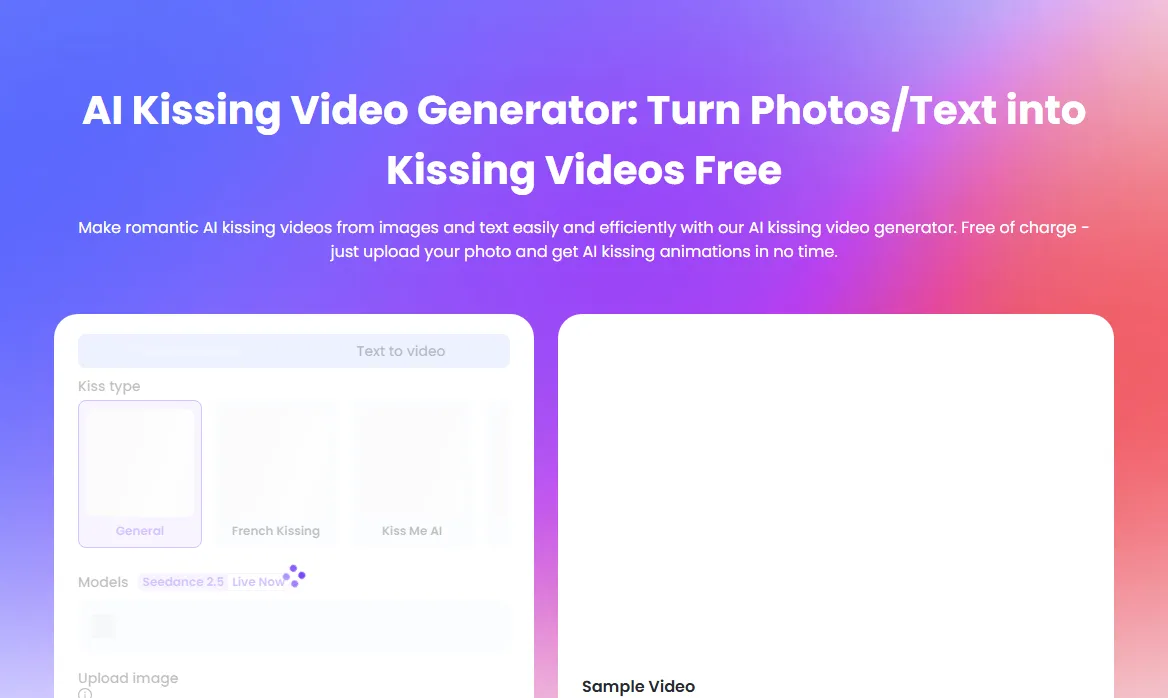
Strip away the branding and the tool is an image-to-video model with a preset motion. You give it a picture of two people close together, or two separate portraits, and it generates a short clip in which they lean in and kiss. "French kiss" is usually just one choice in a list of kiss styles. On EaseMate's page, for example, the kiss type selector we captured lists General, French Kissing and Kiss Me AI as separate options, which tells you it is a style preset and not a different technology.
The clips are short because the underlying video models generate a few seconds at a time. If you want the broader picture of how this kind of clip works, our step-by-step guide on how to make an AI kissing video covers the workflow, and the roundup of free AI kissing video generators ranks the tools. This page has a narrower job: the French kiss search, and the words people add to it.
Everything below about features comes from the official pages we read on November 18, 2026, and we flag each time a page is silent. How good the kiss motion looks is something only a sample in each tool can show.
Free, unlimited, no login, 10 seconds: what each label means
The related searches Google shows for this topic are a good map of what people worry about: free unlimited, free without login, free 2 photos and 10 seconds. Here is how we read each one after comparing the official pages.
| Label | What the pages we read say | Our reading |
|---|---|---|
| Free | Vidu says the generator is free to use. EaseMate says free of charge and 30 free credits per day after login. Deevid gives 20 credits at registration. | True as a way in. Always with a credit allowance or a watermark attached. |
| Unlimited | None of the four pages promises unlimited clips. EaseMate states a daily credit amount, Vidu says monthly credits, Deevid sells credit plans. | Treat it as marketing. The pages describe allowances, not an absence of limits. |
| No login | EaseMate shows a Log In link and ties its free credits to logging in. DomoAI shows Sign In. Vidu's page does not say. Deevid's free credits come with registration. | Not confirmed for any of them. Check before you upload. |
| 2 photos | Vidu accepts one photo of two people or two photos with the same aspect ratio. EaseMate says the photo should contain two people. | Supported on the pages that describe uploads, with conditions. |
| 10 seconds | EaseMate shows a duration setting without listing lengths. Vidu and DomoAI state no length. | Not published on the pages we read. |
The takeaway is simple. "Free" is the only label that holds up everywhere, and it holds up in the sense of a starter allowance. If a site tells you it is unlimited, no login and ten seconds all at once, it is describing a combination that none of the pages we read claims.
What the official pages say, tool by tool
We read these pages on November 18, 2026. Pages change, and so do credit rules, so treat the numbers as a snapshot.
EaseMate
EaseMate's AI kissing video generator page is the most explicit of the four. It says the tool is free of charge, that logging in gives 30 free credits per day, and that this is enough for 2 kiss videos. It says downloaded clips have no watermark. It accepts JPG, JPEG and PNG, with WEBP also mentioned on the upload fields and a 20 MB limit, recommends clear photos that show all facial features, and says the photo should contain two people for kissing videos. There is also a text-to-video option for people with no photo. What it does not say: how long the clips are, or how uploaded photos are stored. The page only links to a privacy policy.
Vidu
Vidu describes its generator as free to use and says it provides dozens of monthly credits for kissing videos. For inputs, you upload either a photo of two people or two individual photos with the same aspect ratio. That last condition is a practical hint: if your two portraits are one landscape and one portrait crop, fix that before you start. The page does not state a clip length, does not mention a watermark and does not say whether you need an account. It links to terms of use and a privacy policy, and it does not address consent from the people in the photos.
DomoAI
DomoAI titles its page a free AI kiss generator and says it works with real photos, drawings and anime characters, using an image of two people close together. It mentions no-watermark options through its plans, which implies a watermark elsewhere, but it does not say which plans. There is a Sign In link, no credit numbers on the page and no clip length. If you want a French kiss specifically, our existing roundup notes that DomoAI lists it as a template, but the page we read on November 18 did not name it, so confirm it inside the app.
Deevid AI
Deevid AI is a general video studio, not a single-effect site. We read its pricing page on November 18, 2026. It says free users' videos carry watermarks and that new users get 20 free credits on registration, roughly four videos. Paid plans: Lite at $10 a month ($120 billed annually) with 200 credits and 720P, Pro at $25 a month ($300 billed annually) with 600 credits and 1080P, and Premium at $119 a month ($1,428 billed annually) with 3,000 credits and 1080P plus priority support. Credits are valid for one year from purchase, and Lite and above include commercial use under the terms of service. We found no dedicated kiss or French kiss page on deevid.ai when we looked on November 18; our own kissing roundup describes the effect as available inside the editor, and we have not confirmed the exact clip length. For the current numbers, see our Deevid AI pricing breakdown.
Single-effect site or full studio: which one fits you
The four tools fall into two types, and the choice is less about quality than about what you plan to do next.
- Single-effect pages (EaseMate, Vidu, DomoAI). Built around one job. You upload, pick a kiss type, generate, download. They suit a one-off clip made for a laugh or an anniversary message. The cost of that simplicity is the sign-in, the daily or monthly credit limits and little control beyond the preset.
- A studio with many tools (Deevid AI). The kiss effect is one thing among text-to-video, image-to-video, music and editing tools. It suits you if this clip is the first of several, for instance if you also want to animate a photo into a normal video. The cost is that you are in a bigger product with a credit system to understand.
If your real goal is to bring a single photo to life without the romance angle, skip the effect pages entirely and read our guide to free image-to-video AI. It covers the same underlying technology without the preset.
One more type deserves a mention for completeness: mobile apps. The Google results for this search include Android apps for kiss and hug effects. We did not read their store pages or privacy declarations for this article, so we cannot say how they handle your photos. If you go that route, read the data safety section before you grant access to your gallery.
Photo quality: the part you control
Whatever tool you choose, the input decides most of the result. The pages themselves give two concrete rules: EaseMate asks for clear photos that show all facial features, and Vidu asks for two images with the same aspect ratio. We would add the habits below, which are general image-to-video practice rather than anything these pages promise.
- Front-facing, both faces fully visible. Hats, sunglasses, hands near the mouth and heavy profile angles all give the model less to work with.
- Similar framing for both people. A tight face crop next to a full-body shot tends to produce an uneven lean. Match scale and crop before uploading.
- Similar light. A warm indoor portrait and a cold outdoor one will look stitched together even if the motion is smooth.
- Enough resolution, within the upload limit. EaseMate states 20 MB. A sharp 1 to 3 MB file is usually plenty.
- Room around the head. If hair or chin touches the edge of the image, the model has nowhere to move.
Expect to regenerate. These models are partly random, and with a daily allowance of around two clips, as on EaseMate's page, a bad pair of photos costs you your day. Choose the photos carefully before you spend credits.
Consent and limits: the rules that matter more than the settings
This is the section to read even if you skip everything else. A kiss clip is intimate by nature, and the technology makes it trivially easy to put real people in a situation they never agreed to. Our rules, in order of importance:
- Only use photos of people who agreed. That means both of them knowing the clip exists. A partner, a friend who is in on the joke, yourself. Never an ex, a coworker, a celebrity or a stranger, and not a photo you found online.
- Adults only. Never create this kind of clip from a photo of a minor, under any framing. This is a hard line, not a gray area.
- Keep it non-explicit. The effect is a short romantic gesture. Using it as a stepping stone to anything sexual, especially with a real person's face, is off the table, and the mainstream tools prohibit it in their terms.
- Label the result as AI generated when you post it. Many platforms now ask for this, and it protects the people in the clip from being mistaken for real footage.
- Know where your photos go. Of the four pages we read, none explains in the page text how uploaded images are stored or reused. Vidu says personal data is fully protected, and the others link to a privacy policy. Read it before uploading photos of someone else.
The question of legality depends on your country, the platform and the tool's terms, and this is not legal advice. In many places, making a deceptive intimate video of a real person without consent can cross lines around likeness, harassment or worse. The simple version: if both people would be comfortable watching it together, you are probably fine. If one of them would not, do not make it.
How to use a free tier without wasting it
Free access on these tools is a starter allowance, so spend it with a plan.
- Read the credit rule first. EaseMate says 30 credits a day cover two kiss videos, so you can test a pair of photos twice and then wait. Deevid's 20 credits on registration are a one-time amount, roughly four videos by its own estimate.
- Check the watermark rule before you generate. Deevid says free videos carry a watermark. EaseMate says downloads are watermark free. Vidu and DomoAI are unclear on their pages. A clip you cannot post without a logo is not a clip you can use.
- Prepare two good photo pairs. Run the best one first, keep the other as a backup.
- Test on a harmless pair first. Two photos of yourself or two cartoon characters will tell you how the preset behaves before you involve anyone else.
- Do not pay until you have what you need. If one clip is the goal, the free allowance is likely enough. A paid plan makes sense when you want more clips, higher resolution or commercial use. Deevid's Lite plan at $10 a month is the entry point on its page.
If you do go further with Deevid AI, the free credits are the natural way to find out whether the interface suits you: start with the free credits, check the watermark on your first result, and decide after that. We receive a commission if you subscribe through that link, at no cost to you.
Our reading of the situation
The honest summary is a little less exciting than the search results. A French kiss video generator is a preset inside an image-to-video tool, free access exists as a starter allowance, and the big promises around it, unlimited use, no account and ten-second clips, are not stated on the official pages we read. The differences that will actually affect you are the credit rules, the watermark and what happens to your photos.
For a single throwaway clip, a dedicated page such as EaseMate's or Vidu's is the faster path, and EaseMate's page is clearest about its daily allowance and watermark. For someone who expects to make more than one video, a studio like Deevid AI is the more flexible home, as long as you accept that the free credits are limited and watermarked. In every case the best decision happens before the upload: pick photos of people who agreed.
What we could not verify: the actual quality of the kiss motion in each tool, the clip length for any of them, whether Deevid has a French kiss option under that name, and how each service handles stored photos.
Frequently asked questions
How can I make two photos kiss with AI?
Pick a tool with a kiss effect, upload one photo of two people or two separate portraits, choose the kiss style, and generate. Vidu's page asks for two images with the same aspect ratio. Use front-facing, clear photos of adults who agreed to be in the clip.
Is there an AI French kiss video generator that is really free?
Free access exists, but as an allowance. On November 18, 2026, EaseMate's page said 30 free credits per day after login, enough for 2 kiss videos, and Deevid's pricing page said 20 credits at registration with watermarked free videos. None of the pages we read promised unlimited use.
Can I use an AI kissing video generator without logging in?
We could not confirm it for any of the four tools. EaseMate and DomoAI show login links, EaseMate ties its free credits to logging in, and Vidu's page does not say. Check the download step, not only the upload step.
Are AI kissing videos limited to 10 seconds?
No official page we read states a clip length. EaseMate shows a duration setting without listing the options, and Vidu and DomoAI give no length. Expect a few seconds and check the setting inside the tool.
What AI can you make two people kiss with?
Several image-to-video tools offer a kiss effect, including EaseMate, Vidu, DomoAI and, according to our existing roundup, Deevid AI. The effects differ in credits, watermark rules and sign-in, so compare those before you choose.
Is there a free AI kissing app?
Google lists Android apps for kiss and hug effects, but we did not read their store pages for this article. Web tools such as EaseMate run in the browser with nothing to install. If you use an app, read its data safety section before granting access to your photos.
Is it safe and legal to make an AI kissing video of someone?
Only with the explicit agreement of every adult in the photos, never with minors, and never for explicit content. Laws on likeness and harassment vary by country, and this is not legal advice. Label the clip as AI generated when you share it.
Does Deevid AI have a French kiss effect?
Our existing roundup describes a kiss and hug effect inside Deevid AI, but we did not find a dedicated French kiss page on deevid.ai on November 18, 2026, and we have not confirmed the exact option name or clip length. Check inside the app.
Start with the free credits
Deevid AI gives 20 credits at registration, roughly four videos according to its pricing page, with watermarks on free output and paid plans from $10 a month. Try it on a harmless pair of photos first.
Try Deevid AI